Access Management — detailed flows
Step-by-step detail for the Access Management (AM) domain: onboarding, offboarding
and profile lifecycle management for an individual end user. This page exists because
onboarding and the wiki/sources/ pages only summarized these flows at a
high level — a wiki/ vs. raw/ size comparison (see wiki/log.md, 2026-07-22 lint
entry) found the two source PDFs behind this domain were digested at only 0.5–0.8% of
their raw extracted-text size, the lowest of any source. This page cross-references, for
each flow: the
exact step IDs in src-end-to-end-process-flows (so it stays traceable to source), the
matching user journey + wireframe in src-user-journeys-ux-requirements, and the
condensed minimum-UX-requirement rules a pilot PSP must implement.
Scope: all of source §1 “Access management” is now covered — the 10 flows with a
matching UX journey (below, with wireframes) plus every remaining onboarding variant,
lifecycle amendment sub-flow, business-user offboarding flow, and §1.4 “Access management
sub-flow” (the sAM-* subprocesses called throughout, e.g. authentication, alias
ownership check, coding). None of these remaining flows have a matching UX
journey/wireframe in src-user-journeys-ux-requirements — the UX doc only illustrates
the 10 journeys already listed above. Genuinely out of scope because the source
document itself never details them as their own flow (no diagram, no step table) — only
references them by ID as a subprocess call: sAM-18 (creation of a surrogate value,
called from sAM-14), sAM-21/sAM-22 (registration / registration removal), sAM-28
(bulk DEAN creation), sAM-29/sAM-30 (DEAN/alias generation and mapping), sAM-31
(DEAN/alias mapping removal). These are all DESP-side operations — they likely correspond
to endpoints in spec-accessmanagement (user registration) and spec-alias
(DEAN/alias operations) rather than to a process-flow diagram; confirming that mapping is
future work, not something this source document can answer.
Wireframe images: extracted as PNG from the source PDF (pages 13–45,
raw/ecb-pilot/docs/img/user-journey-ux-requirements/am-page-NN.png, 200dpi) on
2026-07-22, because the wireframes carry UI information (screen names, field layout,
button labels) that the text extraction cannot capture — useful later for actual GUI
work. The 11 images actually linked below are duplicated into
wiki/assets/img/user-journey-ux-requirements/ (2026-07-22) so they sync with the
_euro-wiki-online publish mirror and resolve on the public site — raw/ itself is
never mirrored (see 400 publish-plan.md §5). The full 33-page extraction stays in
raw/ only.
Quick reference
| UX journey | Underlying flow | Wireframe |
|---|---|---|
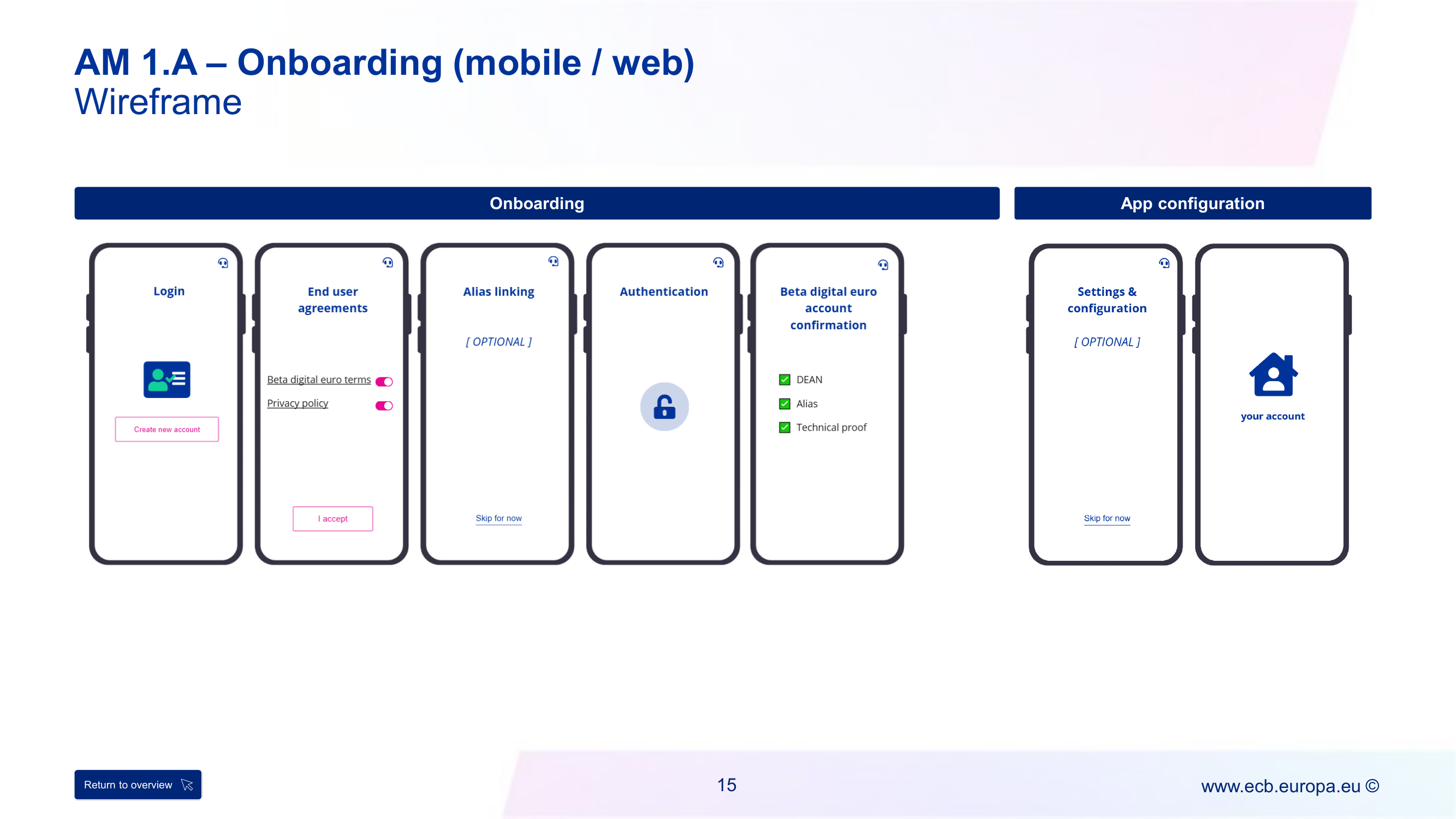
| AM 1.A – Onboarding (mobile/web) | AM-1.1 (Part I, online) | am-page-15 |
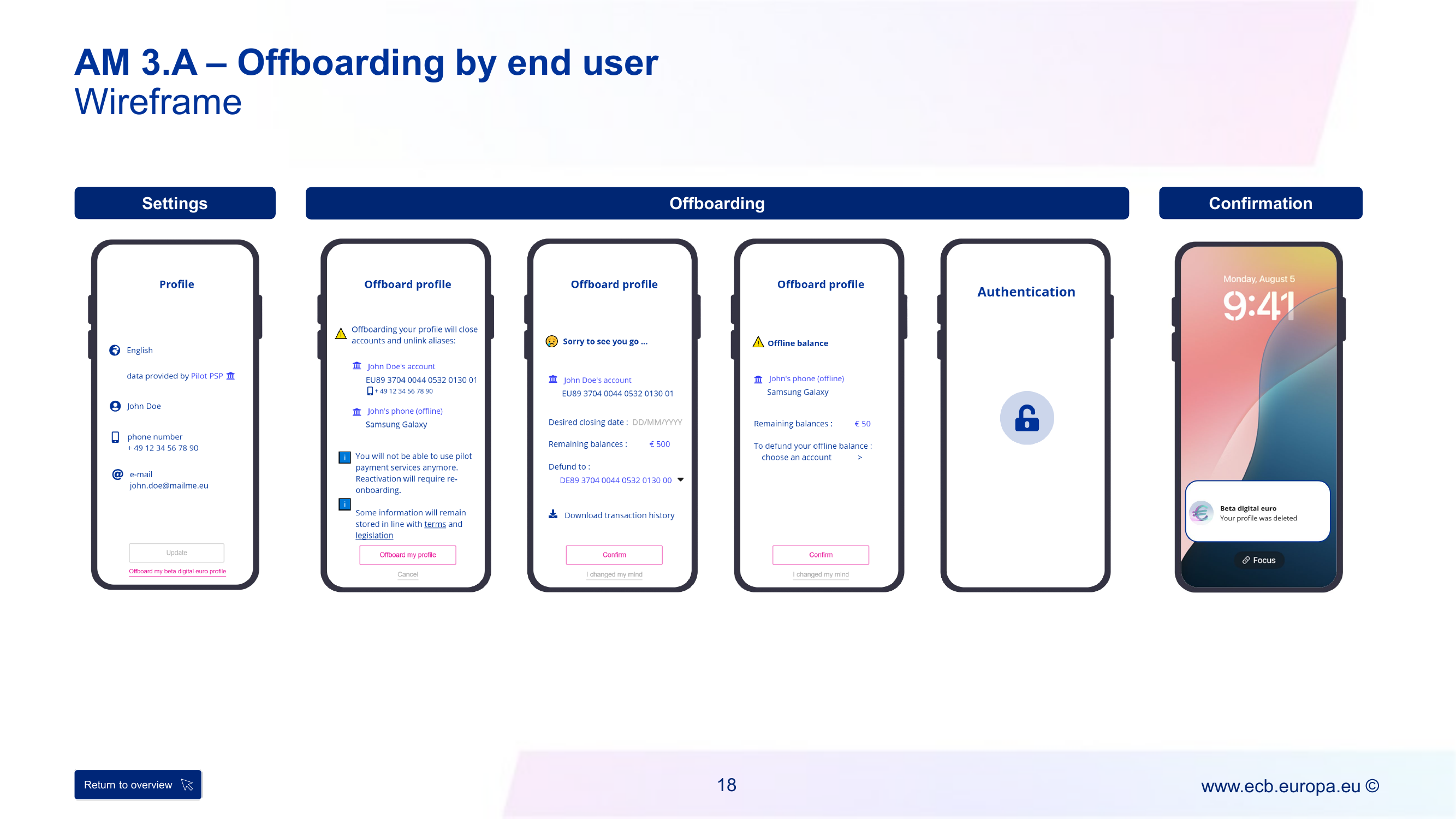
| AM 3.A – Offboarding by end user | AM-3.1 | am-page-18 |
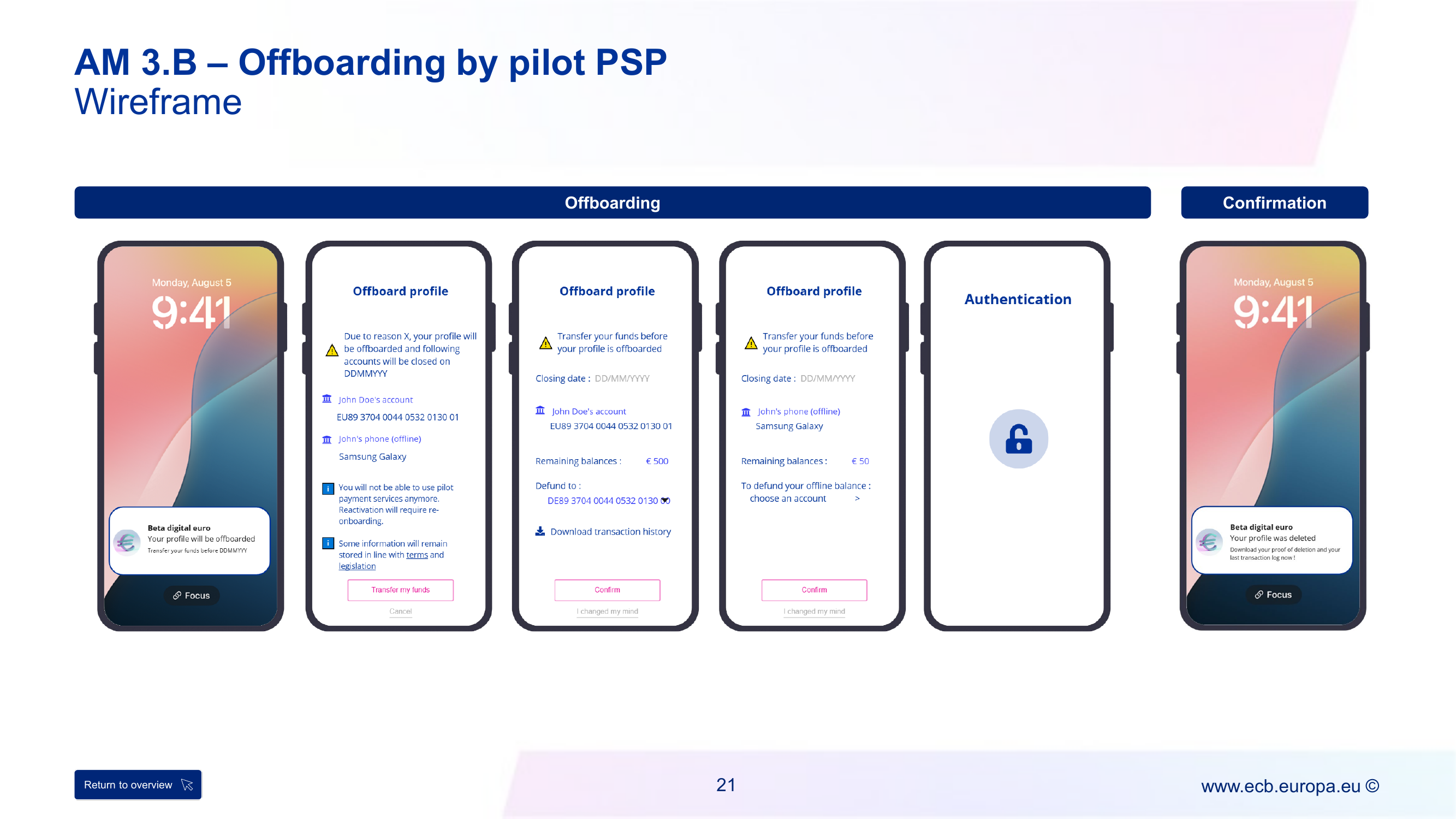
| AM 3.B – Offboarding by pilot PSP | AM-3.1 (same flow, PSP-initiated) | am-page-21 |
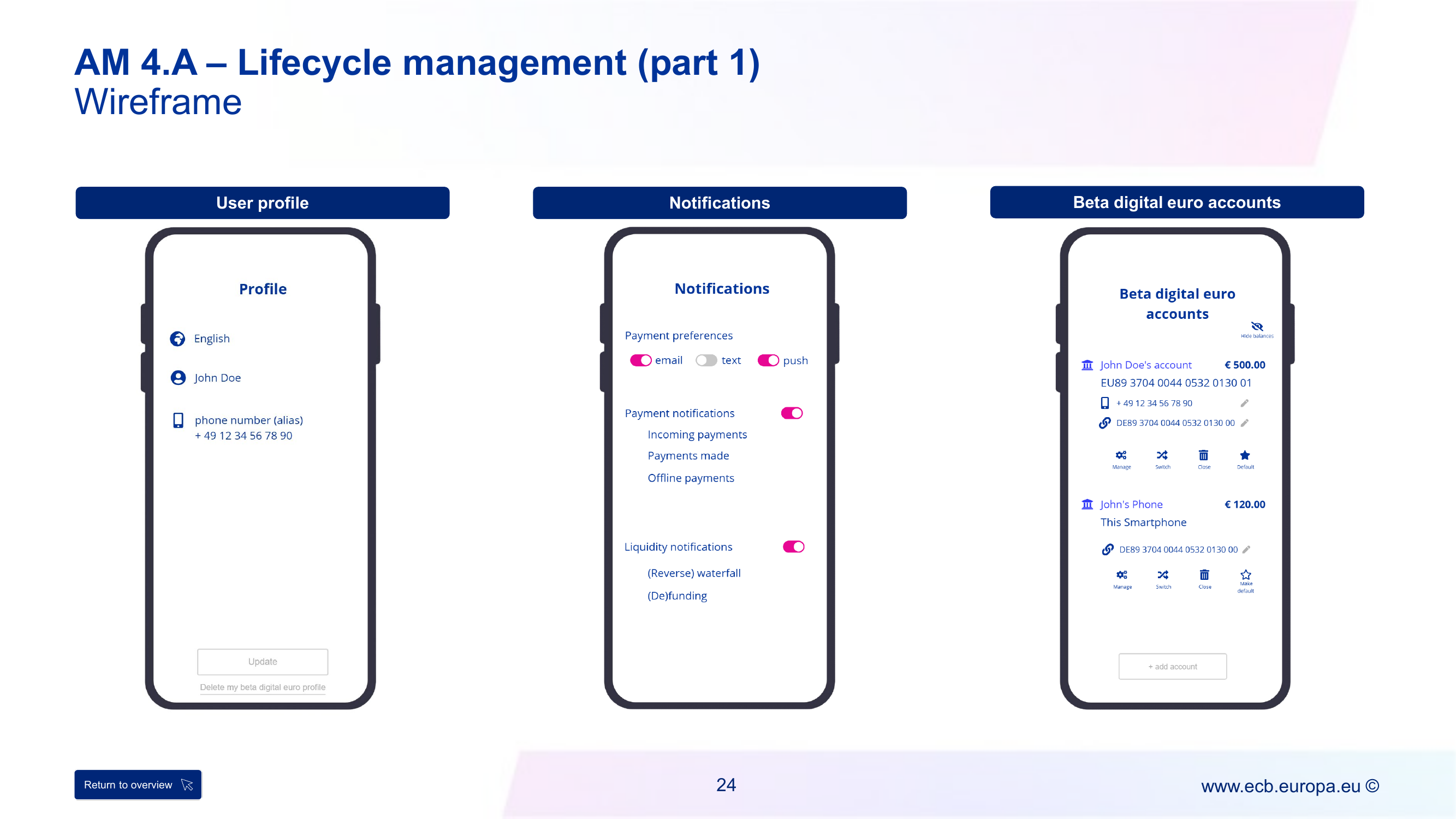
| AM 4.A – Lifecycle management (parts 1–2) | AM-4.1.2, AM-4.1.9, AM-4.1.3 (+ AM-4.1.4, 4.1.7, 4.1.8 not detailed here) | am-page-24, am-page-26 |
| AM 4.B – Alias linking | AM-4.1.9 | am-page-29 |
| AM 4.C – Alias unlinking | AM-4.1.9 (same flow, unlink variant) | am-page-32 |
| AM 4.D – IBAN linking | AM-4.1.1 | am-page-35 |
| AM 4.E – IBAN unlinking | AM-4.1.1 (same flow, unlink variant) | am-page-38 |
| AM 4.F – Account blocking | AM-4.1.6 | am-page-41 |
| AM 4.G – Account unblocking | AM-4.1.6 (same flow, unblock variant) | am-page-44 |
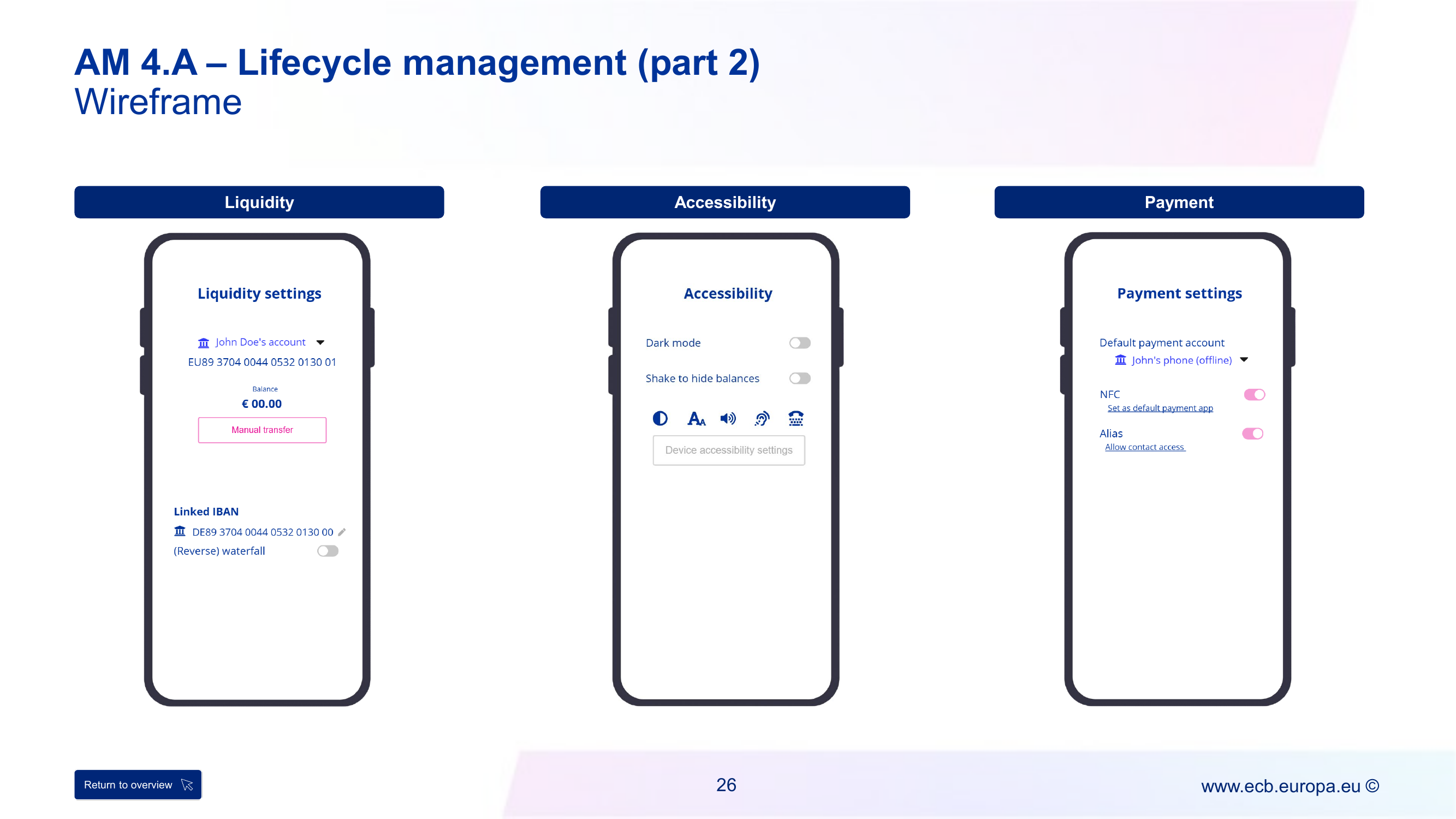
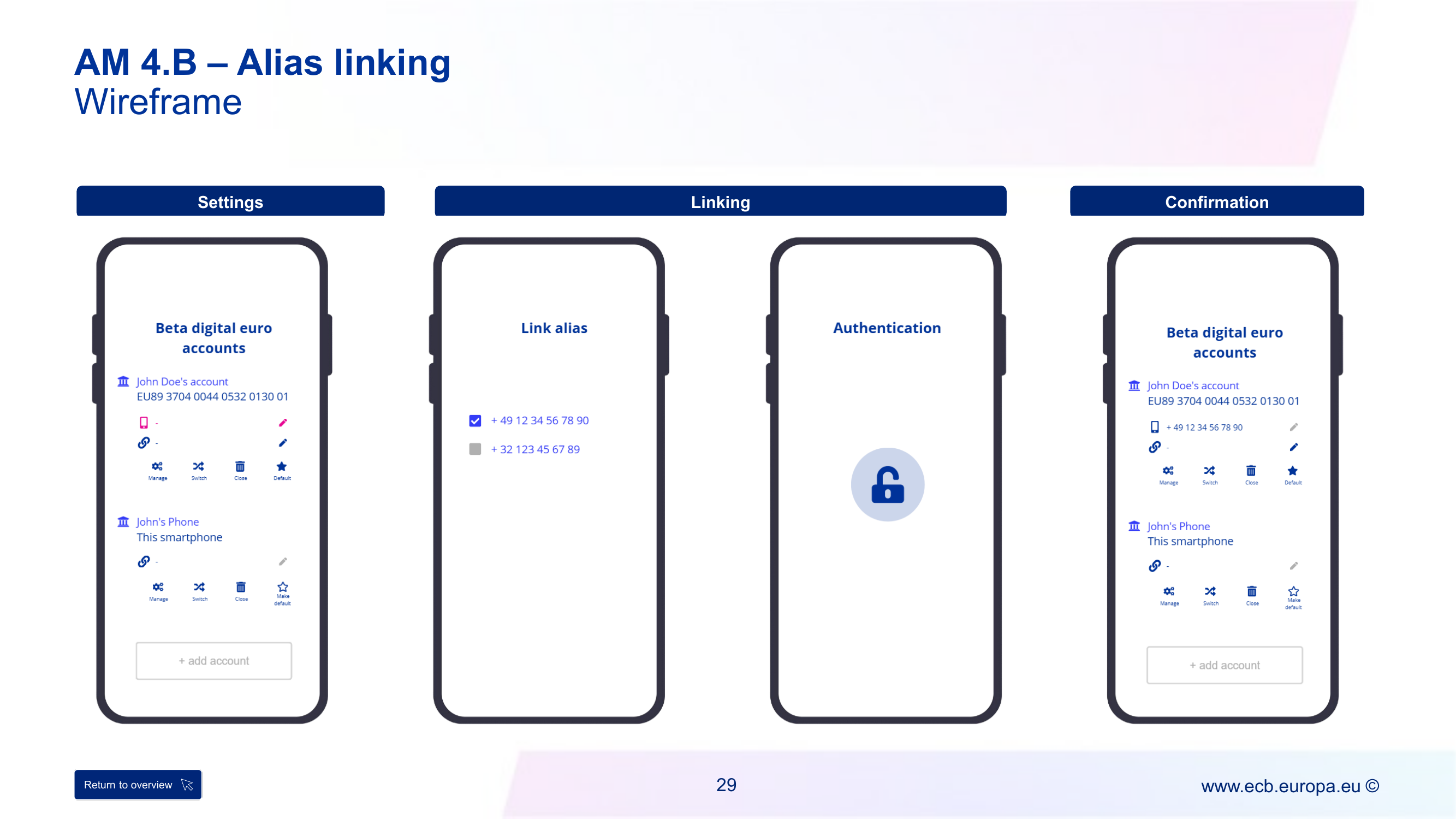
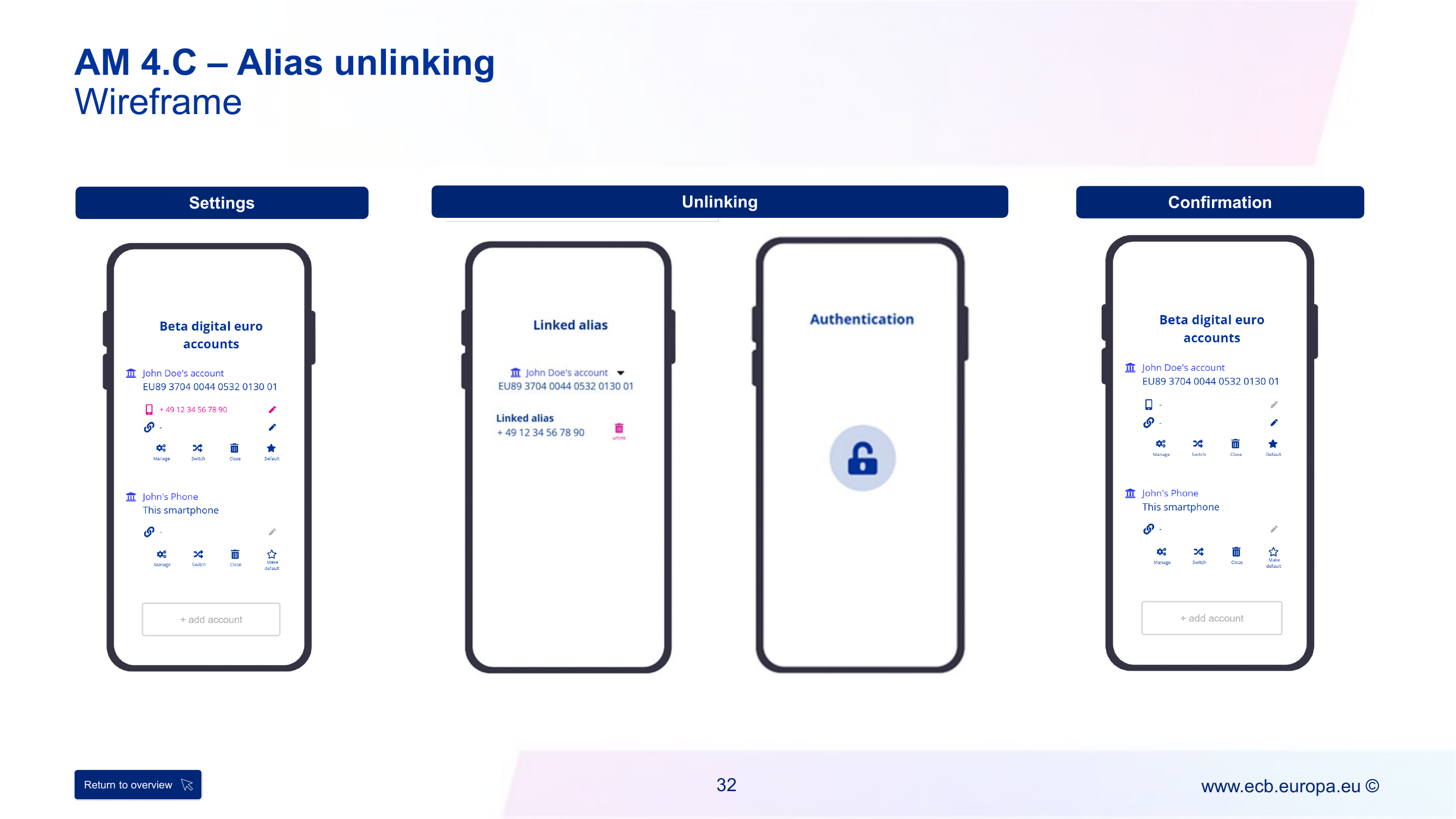
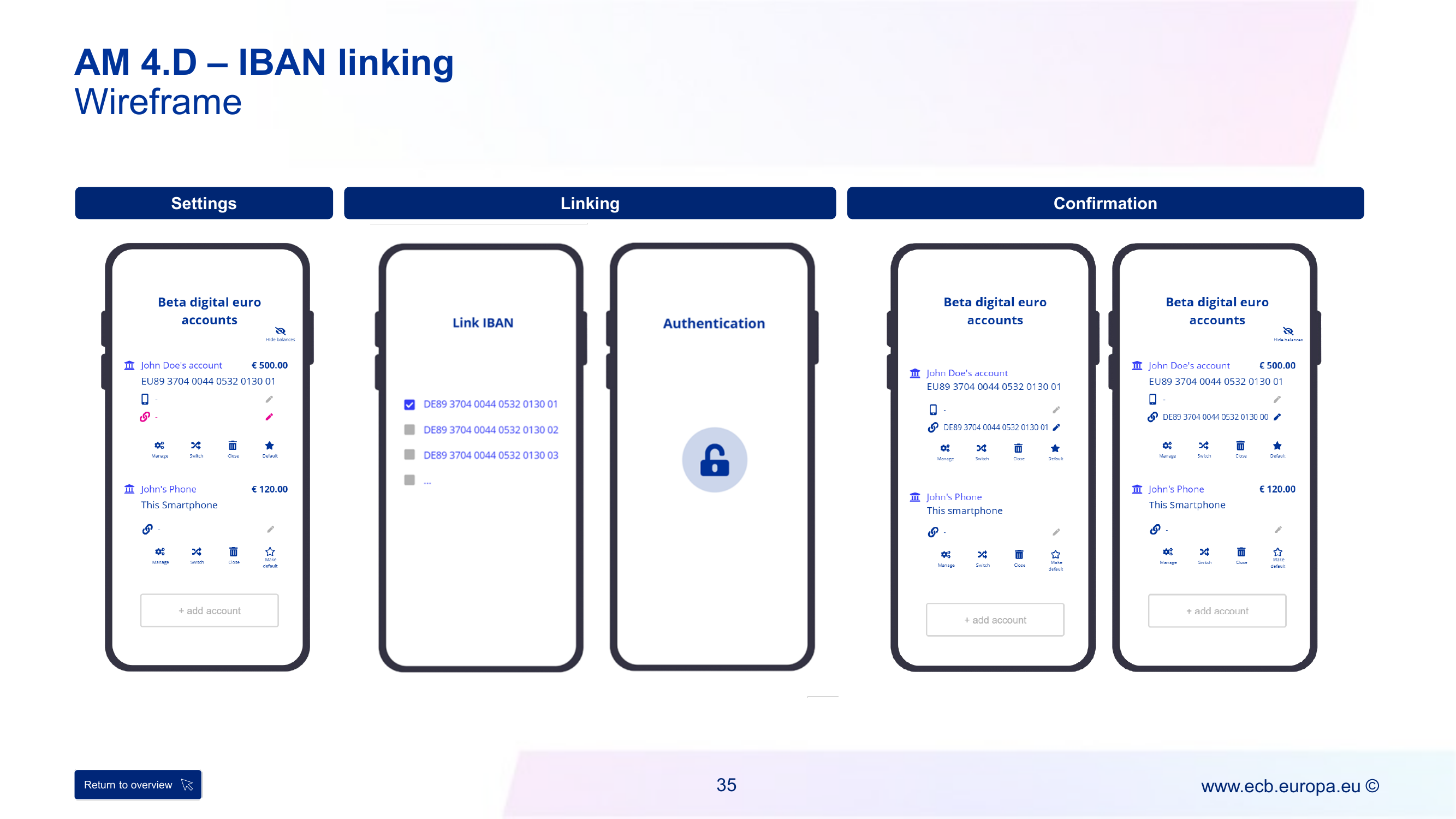
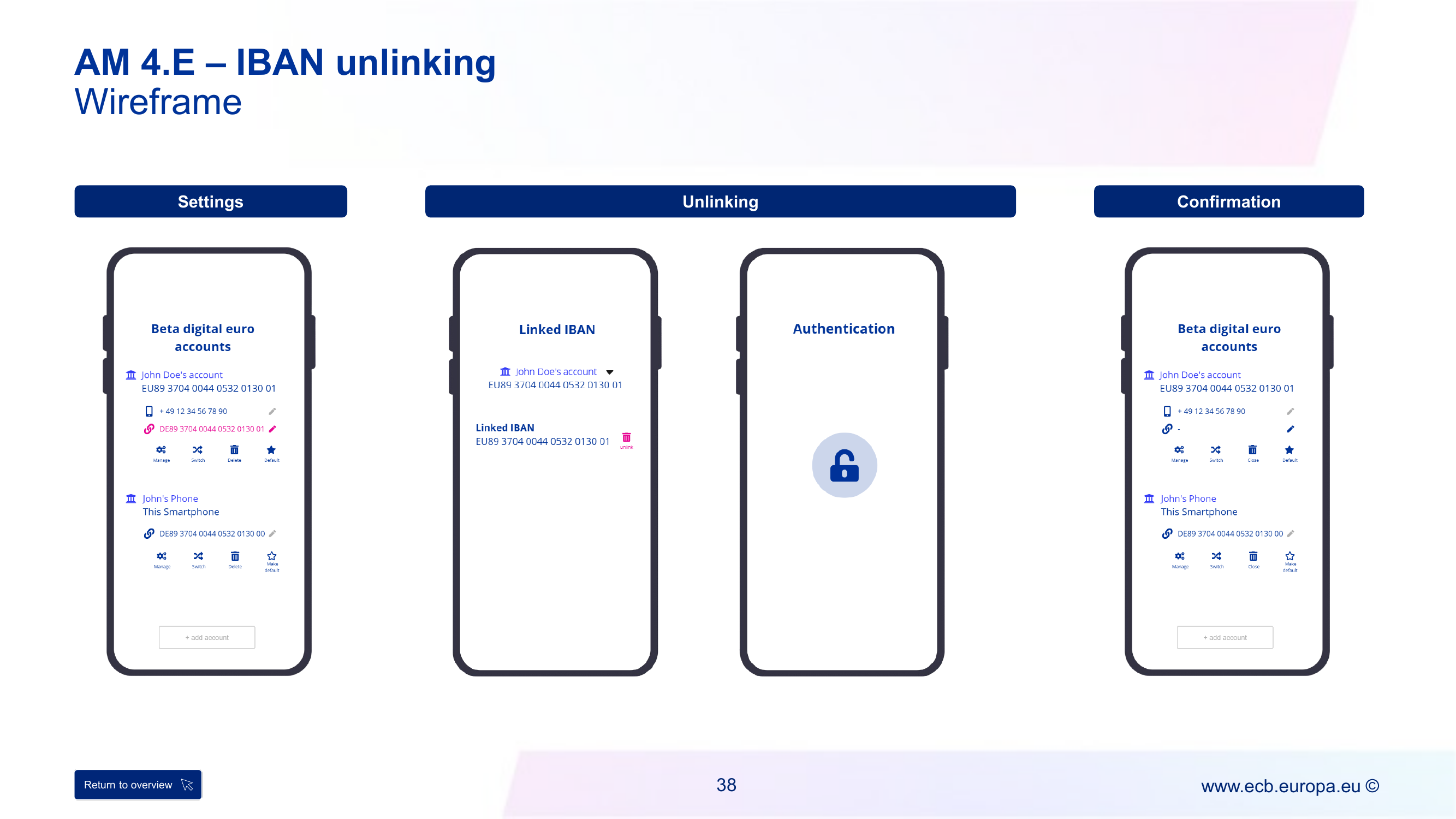
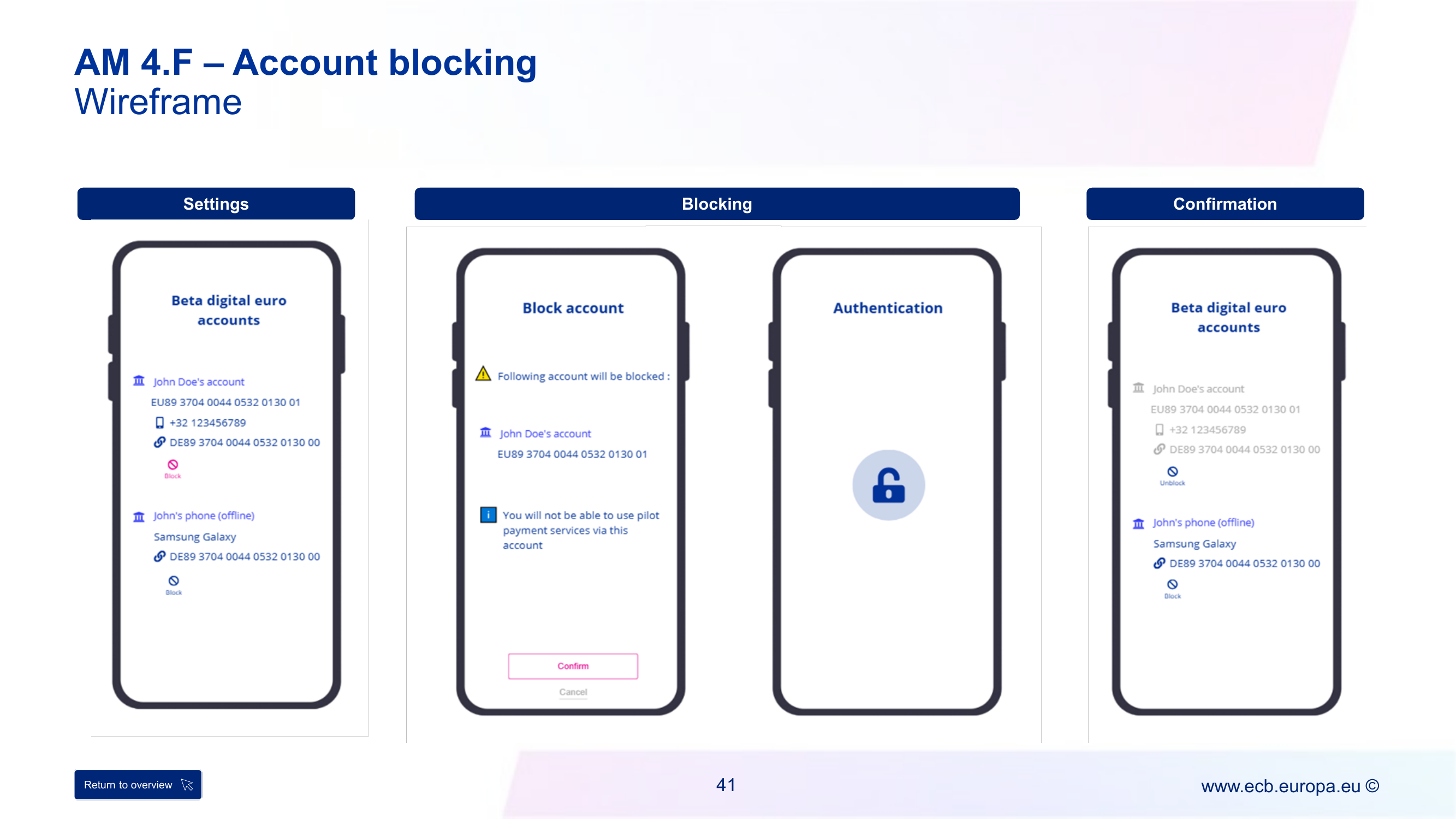
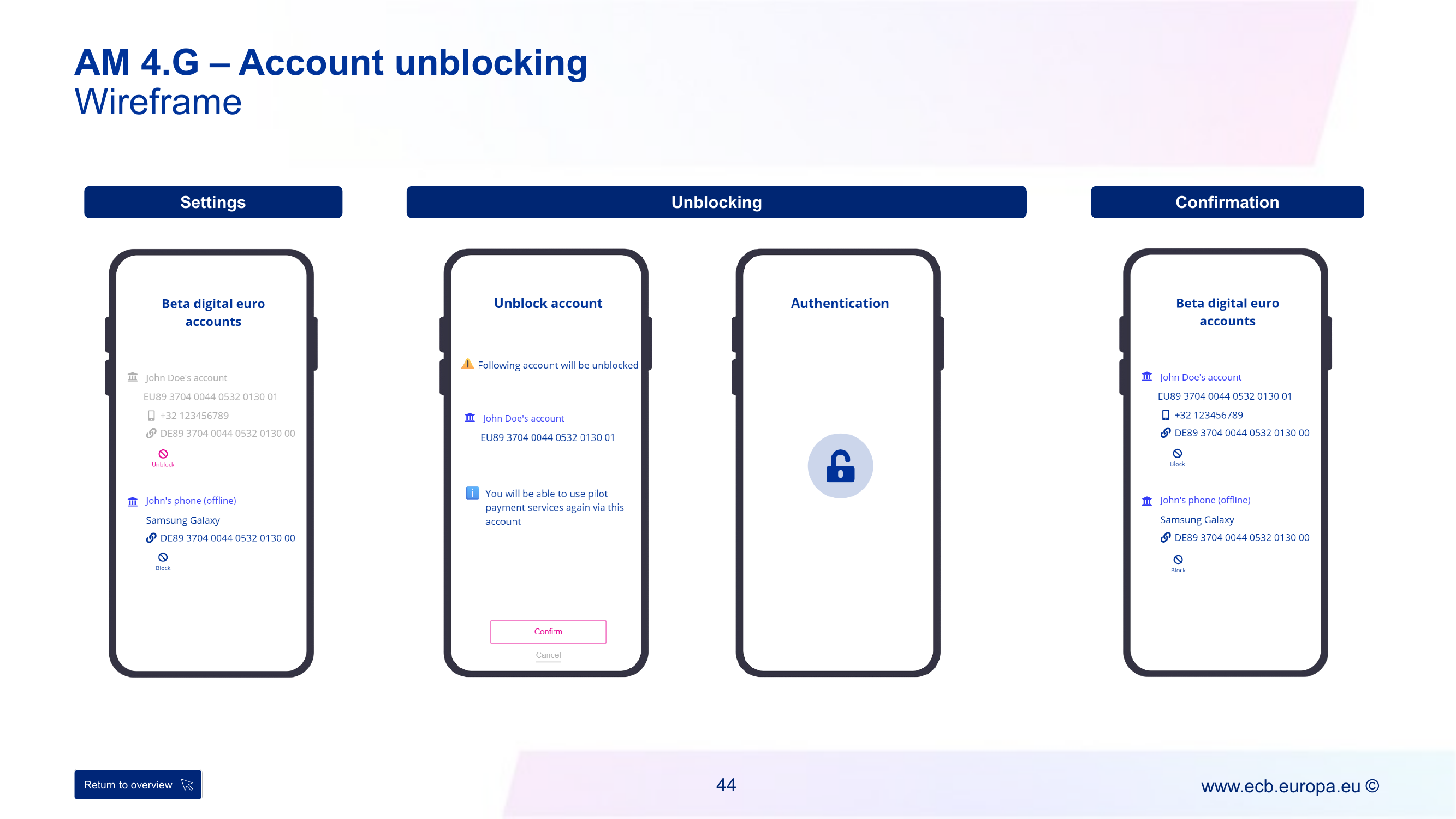
Flows are documented once below (deduplicated where two journeys share one flow ID).
AM-1.1 — Onboarding of an individual end user, Part I (online)
Actors: Individual end user, Pilot PSP, DESP (Eurosystem – Access Gateway Service,
Single Access Point Service, Alias Lookup – Access Gateway Service). 40 steps,
AM-1.1.01–AM-1.1.40. (Source note: the raw doc’s step table mislabels both “onboarding
part II” and “informs completion” as .38 — the flow diagram itself uses .38/.39
correctly, which is what’s used below.)
- End user requests onboarding (
.01). If not an existing customer, PSP runs KYC (.02–.08); failure rejects and restarts at.01. - PSP checks the user doesn’t already hold a beta digital euro account at the same
PSP (
.09–.11) — reject if so; else registers the user as a customer and starts authentication[sAM-17.1](.12). - PSP asks DESP (via Eurosystem Access Gateway Service → Single Access Point Service)
whether the user already holds an account at another PSP (
.13–.18) — reject/ redirect to the switching flow if so. - PSP generates and stores the technical proof of balance ownership (
.19), then proposes optional alias linking (.20–.22); if accepted, runs alias ownership check[sAM-25]and authentication+consent[sAM-17.2](.23–.24). - PSP requests registration from DESP
[sAM-21](.25–.28, reject path included). - dean assignment: reuse a bulk-requested DEAN or request a new one from DESP, with
optional alias registration/mapping via Alias Lookup – Access Gateway Service
[sAM-29]/[sAM-30](.29–.36). - PSP opens the account (
.37), triggers Onboarding Part II[sAM-26](.38— not detailed in this pass, see raw source §1.4.7), and informs the end user of completion, returning DEAN + technical proof + PSP identifier (.39–.40).
Minimum UX requirements (AM 1.A): max 4 steps after opening the frontend solution; T&Cs/privacy acceptance must be an explicit mandatory step (not a pre-tick); alias linking is optional; completion confirmation must include the DEAN; the technical proof must be explained to the end user and provided on a durable medium that stays accessible after onboarding; “Settings” (profile/liquidity config) is an optional post-onboarding step, not blocking.
Wireframe screens: Login → End user agreements (T&Cs + privacy toggle) → [optional] Alias linking → Authentication → Beta digital euro account confirmation (shows DEAN, alias, technical proof as checked items) → [optional] Settings & configuration.
AM-3.1 — Offboarding of an individual end user (online and offline)
Actors: Individual end user, Pilot PSP, DESP. 25 steps, AM-3.1.01–AM-3.1.25. Same
flow ID backs both AM 3.A (end-user-initiated) and AM 3.B (PSP-initiated) — the source
doc doesn’t split them into separate flows, only the triggering step (.01, marked
optional/not applicable when the PSP initiates) and the UX framing differ.
- Offboarding requested — by the end user (
.01) or the PSP itself — PSP validates the request (.02–.05, reject path). - Authentication
[sAM-17.1](.06), then PSP locks the account and payment instrument(s) (.07) and runs disable coded user details[sAM-15](.08). - If balance isn’t zero (
.09), PSP checks the destination (defunding) account status[sLM-24]and runs the defunding sub-flow (.10–.13, reject path if invalid). - PSP requests deactivation of the DEAN-to-PSP mapping and any linked alias — DEAN and
mapping removal
[sAM-31](.14–.17, reject path) — then requests deactivation of the DESP registration — registration removal[sAM-22](.18–.20, reject path). - PSP deactivates the user’s data (
.21), closes the account (.22), disables the payment instrument(s) (.23), and informs the end user of completion (.24–.25).
Minimum UX requirements — AM 3.A (end-user-initiated): explicit confirmation
required before executing offboarding; online accounts require selecting a defunding
account (free-text IBAN or an already-linked one) before offboarding is even offerable;
offline accounts can only close at zero balance; end user can retain transaction history
in a standardised open format; end user can cancel before authentication starts;
[optional] PSP may offer a grace-period undo and/or an exit feedback form.
Minimum UX requirements — AM 3.B (PSP-initiated): PSP must notify the end user with a reason, using neutral, non-specific language for fraud/risk/security-related reasons; notification must prompt fund transfer before the offboarding date; if the end user sets no configurable details, the PSP-initiated flow may proceed without end-user authentication; otherwise authentication is required to confirm the details.
Both: confirmation of offboarding + defunding is mandatory; all frontend solutions/payment instruments linked to the profile are deactivated; end user is logged out of all pilot payment services.
Wireframe screens (AM 3.A): Settings → Offboarding (defunding account choice, closing date) → Confirmation. AM 3.B: Confirmation → Offboarding (PSP-initiated notice + reason).
AM-4.1.1 — Individual end user amendments: account (IBAN) linkage
Actors: Individual end user, App/pilot PSP, DESP. 9 steps, AM-4.1.1.01–.09. Backs
both AM 4.D (IBAN linking) and AM 4.E (IBAN unlinking) — same step shape, opposite
direction.
- End user selects the beta digital euro amendments option (
.01), PSP retrieves available amendment options (.02). - End user selects “commercial bank money account” (
.03), PSP retrieves/displays current linking settings (.04). - End user amends the linked account (
.05); authentication+consent[sAM-17.2](.06). - PSP saves the linked-account info (
.07) and informs completion (.08–.09).
Minimum UX requirements — linking (AM 4.D): only IBANs with verified existence/
ownership are eligible; one IBAN per account max; confirmation required;
[optional] PSP may let the end user activate waterfall/reverse-waterfall for the new
IBAN in the same action. Unlinking (AM 4.E): unlinking disables waterfall/reverse
waterfall (must be disclosed); [optional] link-a-new-while-unlinking-the-old in one
action.
Wireframe screens: Settings → Linking/Unlinking → Confirmation.
AM-4.1.2 — Individual end user amendments: liquidity management settings
Actors: Individual end user, App/pilot PSP, DESP. 9 steps, AM-4.1.2.01–.09. Same
select→retrieve→amend→authenticate→save→confirm shape as AM-4.1.1, applied to liquidity
settings (waterfall/reverse waterfall thresholds, funding/defunding automation) instead
of IBAN linkage. Feeds journey AM 4.A (Lifecycle management, part 2 — “Liquidity”
section).
Minimum UX requirements: waterfall/reverse waterfall require a linked IBAN (disabled
- explained otherwise, per funding-and-defunding); offline accounts don’t support
waterfall/reverse waterfall at all; end user can set automated funding/defunding rules
(frequency/threshold/amount);
[optional]one-off manual top-up/withdrawal;[optional]balance display in the liquidity settings screen itself.
AM-4.1.3 — Individual end user amendments: online notification preferences
Actors: Individual end user, App/pilot PSP, DESP. 9 steps, AM-4.1.3.01–.09. Same
shape again, applied to notification settings. Feeds AM 4.A part 1 (“Notifications”
section).
Minimum UX requirements: notification options must be equivalent to those offered
for other means of payment; end user can opt in/out per event type (successful/failed/
scheduled payments, payment requests, liquidity events like waterfall/funding/
defunding); [optional] language change applies live without app restart.
AM-4.1.6 — Individual end user amendments: (un)blocking the beta digital euro account
Actors: Individual end user, App/pilot PSP, DESP. 12 steps, AM-4.1.6.01–.12. Backs
both AM 4.F (blocking) and AM 4.G (unblocking).
- Select amendments option → retrieve options (
.01–.02) → select “(un)blocking” (.03) → authentication+consent[sAM-17.2](.04) → PSP (un)blocks the account (.05). - If linked payment instrument(s) are (in)active (
.06), PSP retrieves/displays them (.07), runs a second authentication+consent[sAM-17.2](.09) and (un)blocks the instrument(s) too (.08,.10). - Informs completion (
.11–.12).
Minimum UX requirements — blocking (AM 4.F): PSP must explain consequences (no send/receive, requires unblock to regain access) before the explicit confirmation step. Unblocking (AM 4.G): PSP must explain that send/receive is restored. Both require authentication and an explicit confirmation before the backend call.
Wireframe screens: Settings → Blocking/Unblocking → Confirmation.
AM-4.1.9 — Individual end user amendments: alias registration
Actors: Individual end user, App/pilot PSP, DESP – Alias Lookup - Access Gateway
Service, DESP – Alias Lookup Service. 18 steps, AM-4.1.9.01–.18. Backs both AM 4.B
(alias linking) and AM 4.C (alias unlinking), and is also the flow referenced generically
by AM 4.A part 1 (“User profile” alias change).
- Select amendments → retrieve options (
.01–.02) → select “alias registration” (.03) → PSP retrieves/displays current alias settings (.04). - End user amends the linked alias (
.05); PSP runs alias ownership check[sAM-25](.06), then authentication+consent[sAM-17.2](.07). - PSP requests addition/update/deletion of the alias (
.08); validity check (.09, reject path.10–.12); PSP forwards the request to DESP (.13), which checks alias validity (.14), amends the alias mapping (.16), and both sides propagate the completion notification back to the end user (.15,.17–.18).
Minimum UX requirements — linking (AM 4.B): only aliases with verified existence/
ownership are eligible for display; [optional] prefill if already pre-registered with
the PSP; phone-number aliases must show the country-code requirement to payers; PSP must
disclose the alias is for transaction/authentication purposes only, never commercial.
Unlinking (AM 4.C): [optional] link-a-new-while-unlinking-the-old in one action.
Both require authentication before the backend call and an explicit success confirmation.
Wireframe screens: Settings → Linking/Unlinking → Confirmation.
Remaining onboarding, offboarding and lifecycle flows (no matching UX journey)
Flows below aren’t illustrated in src-user-journeys-ux-requirements — no wireframe, no minimum-UX-requirements list — only a process flow in src-end-to-end-process-flows. Grouped by source section.
§1.1 — remaining onboarding variants
AM-1.2 — Onboarding of a business end user (online and offline)
Actors: Business end user, Pilot PSP, DESP. 32 steps, AM-1.2.01–.32. Same
KYC → customer registration → technical proof → DESP registration [sAM-21] → DEAN
assignment [sAM-29] shape as AM-1.1, but shorter — it skips both
AM-1.1’s “does the user already hold an account at another PSP” DESP check
(AM-1.1.13–.18) and its alias step (AM-1.1.20–.24, business end users can’t use an
alias, per FUR.15):
- Authenticate & request onboarding (
.01) → existing-customer check, KYC if needed (.02–.09, reject path) → register as customer (.10) → generate & store technical proof (.11). - Request DESP registration
[sAM-21](.12–.15, reject path) → DEAN assignment: reuse a bulk-requested DEAN or request a new one[sAM-29](.16–.20, reject path). - PSP requests the business end user to link a commercial bank money account (
.21), which the user provides (.22) and the PSP links to the beta digital euro account (.23) — mandatory, not optional: “every beta digital euro account of a business end user needs to be linked to a commercial bank money account at any time and (reverse) waterfall option needs to be active at any time” (business ruleLM-032-001). - PSP activates acceptance solutions (online acceptance instruments,
.24) — technical/ IT integration not depicted in the flow. - Optional notification settings setup (
.25–.27). - PSP opens the account (
.28); the end user can loop back to add another online account (.29→ back to.16) or another acceptance interface (.30) before completion is confirmed, including DEAN, technical proof and PSP identifier (.31–.32).
AM-1.3 — Digital euro app configuration and onboarding of an individual end user
Actors: Individual end user, digital euro app, DESP – digital euro app Backend
Service, Pilot PSP. 6 steps, AM-1.3.01–.06. This is the Eurosystem-provided app’s
PSP-selection flow, distinct from AM-1.1’s PSP-proprietary-app path:
- End user installs/opens the digital euro app (
.01), which requests pilot PSP reference data from the DESP – digital euro app Backend Service (.02–.03). - App prompts the end user to select a pilot PSP (
.04–.05). - Flow continues into AM-1.1 — the app connects the end user with the selected PSP
(
.06).
AM-1.4 — Bulk DEAN request
Actors: Pilot PSP, DESP. 4 steps, AM-1.4.01–.04. The prerequisite that makes
“DEAN already available?” (AM-1.1.29/AM-1.2.16) resolve Yes at actual onboarding
time: PSP requests bulk creation of a batch of DEANs, mapped to itself (.01); DESP
creates them [sAM-28] (.02); PSP receives a rejection and can retry, or receives
and stores the DEANs for later assignment (.03–.04).
§1.2 — remaining lifecycle amendment sub-flows
All three follow the exact select→retrieve→amend→authenticate→save→confirm shape already
seen in AM-4.1.2/AM-4.1.3 — 9 steps each unless noted, all gated by
authentication+consent [sAM-17.2]. Referenced generically by journey AM 4.A but with
no dedicated wireframe.
AM-4.1.4 — Individual end user amendments: offline notification preferences
Same shape as AM-4.1.3, applied to the offline device/app instead of the
online channel. AM-4.1.4.01–.09.
AM-4.1.7 — Individual end user amendments: (de)activate payment instrument(s)
11 steps, AM-4.1.7.01–.11. Extends the base shape with two extra subprocess calls
after (de)activating the instrument (.05–.07): coding request [sAM-14] (.09)
and disable coded user details [sAM-15] (.08) run in parallel before completion is
confirmed (.10–.11) — deactivating an instrument also disables its NFC surrogate
value.
AM-4.1.8 — Individual end user amendments: user data
9 steps, AM-4.1.8.01–.09. Same shape, applied to personal data (name, alias-eligible
data such as phone number) — the generic backing flow for alias’s “manage personal
data” requirement.
§1.3.2 — Business end user offboarding
AM-3.2 — Offboarding of a business end user (online and offline)
Actors: Business end user, Pilot PSP, DESP. 20 steps, AM-3.2.01–.20. Same shape as
AM-3.1 with a key assumption: offboarding a business end user closes
all accounts that user has with the same PSP; if they have accounts at multiple PSPs,
the whole process repeats per PSP.
- Offboarding requested (
.01, optional/skipped if PSP-initiated) → PSP validates (.02–.05, reject path) → authentication[sAM-17.1](.06, also skipped if PSP-initiated) → PSP schedules contract cancellation (.07— the actual start of the flow when PSP-initiated). [optional]PSP disables online/offline acceptance solutions once the cancellation date is reached (.08) and locks the account (.09).[optional, offline only]SoftPOS defunding of offline beta digital euro[sTM-29](.10) — note: locking the account does not block the PSP from still initiating this defunding.- DEAN/mapping deactivation
[sAM-31](.11–.13, reject path) → registration deactivation[sAM-22](.14–.16, reject path) → PSP deactivates the user’s data (.17) and closes the account (.18) → completion confirmed (.19–.20).
§1.4 — Access management sub-flows
The reusable subprocesses called (by [sAM-*] bracket reference) from the onboarding/
lifecycle/offboarding flows above.
sAM-13 — Account closure (business end user) sub-flow
11 steps, sAM-13.01–.11. Called from AM-3.2’s account-closing steps (functionally
the same as AM-3.2’s .09–.19, presented as a standalone reusable sub-flow): lock
account (.01) → DEAN/mapping removal [sAM-31] (.02–.05, reject path) →
registration removal [sAM-22] (.06–.08, reject path) → deactivate the business end
user’s data (.09, business rule AM-042-002) → confirm closure (.10–.11).
sAM-14 — Coding request sub-flow
8 steps, sAM-14.01–.08. Generates the NFC “coded user details” (surrogate value) used
for offline/POS payments: [optional] periodic renewal before expiry, or an app-initiated
request (.01–.02) → PSP requests coding from DESP’s SEPI (Secure Exchange of
Payment Information) Service (.03) → creation of a surrogate value [sAM-18]
(.04, not itself detailed in source — see this page’s scope note) → reject path
(.05–.06) or success: PSP receives, stores and forwards the coded user details to the
app (.07–.08).
sAM-15 — Disable coded user details sub-flow
13 steps, sAM-15.01–.13. The inverse of sAM-14, run e.g. during offboarding (AM-3.1)
or payment-instrument deactivation (AM-4.1.7): app/PSP requests disablement of an
existing surrogate value via the SEPI Access Gateway Service (.01–.03); if it doesn’t
exist/isn’t valid, rejected (.04–.08); else SEPI Service disables it (.09) and
confirmation propagates back through PSP to the app (.10–.13).
sAM-17.1 / sAM-17.2 / sAM-17.3 / sAM-17.4 — Authentication family
The single most-referenced subprocess group — every [sAM-17.x] bracket seen throughout
this page resolves to one of these four:
sAM-17.1Authentication via app/device/browser (11 steps) — plain auth, no consent: app/device/browser requests auth from the payer (.01), payer authenticates (.02), details forwarded to the PSP for validation (.03–.04); reject path notifies payer and, optionally, propagates to the payee’s PSP/payee (.05–.10); success displays a confirmation (.11).sAM-17.2Authentication and consent via app/device/browser (22 steps) — same authentication steps (.01–.10) plus an explicit payment-consent step afterwards: app requests consent (.11), payer consents or not (.12–.15, reject path), consent details forwarded and validated (.16–.20, reject path), success sends and displays an authentication confirmation (.21–.22). This is the variant used by every lifecycle amendment flow above (always bracketed[sAM-17.2], never.1) — amendments require consent, plain access doesn’t.sAM-17.3Mutual offline secure application authentication (14 steps) — device authentication (this is source §1.4.5, distinct from §1.4.4’s app-level17.1/17.2): two offline secure applications (payer’s and payee’s devices) authenticate each other bidirectionally using locally exchanged authentication data, no server round-trip; either direction can reject (.03–.09,.12–.14).sAM-17.4Offline authentication via app (7 steps) — app-level authentication fully offline: app requests auth (.01), payer authenticates (.02), the offline secure application (not a server) validates it (.03–.04); reject path (.05–.07).
sAM-25 — Alias ownership check sub-flow
6 steps, sAM-25.01–.06. Already referenced above (AM-1.1 .23,
AM-4.1.9 .06): PSP requests proof of alias ownership (.01), end
user provides it (.02), PSP validates (.03–.04, business rules AM-021-007/
AM-021-009), reject path notifies the end user (.05–.06).
sAM-26 — Onboarding of an individual end user, Part II sub-flow
12 steps, sAM-26.01–.12. Triggered by AM-1.1.38 right after the account is opened —
this is where the “[optional] End user configures profile and liquidity settings” step
from journey AM 1.A’s wireframe actually happens:
[optional]Link a commercial bank money account (.01–.03).[optional]Set up liquidity management settings — waterfall/reverse waterfall etc. (.04–.06).[optional]Set up notification settings — applied differently for online vs. offline (.07–.10).- PSP activates the payment instrument(s) (
.11) and, for NFC/offline use,[optional]runs a coding request[sAM-14]to generate the coded user’s detail (.12, not applicable for offline-only onboarding).
All journeys on this page also inherit generic-ux-requirements (authentication, error handling, feedback/positioning, accessibility — applies across all domains, not repeated per-journey here).
Related
onboarding · alias · dean · authentication · funding-and-defunding · pilot-psp · desp · generic-ux-requirements · src-end-to-end-process-flows · src-user-journeys-ux-requirements